Your songs.
Minus the drums.
Upload a track you own. Drumto lifts the drums out of the recording, charts the part, and grades every hit you play on your electronic kit, at any tempo.
No card needed. Android tablet and a MIDI e-kit required to play.
From a recording to a practice session in three steps
No catalogue, no covers. The track you upload is the track you practise.
- Drop your track heremp3, wav, flac, m4a · up to 50 MB
- my-band-take-3.wav41.2 MB
- drums.musicxmlchart
1Upload the song and, if you have one, the drum part
Any mp3, wav, flac or m4a you own. Add a MIDI or MusicXML drum part from your notation app and the chart is exact; skip it and Drumto transcribes a draft for you to check.
- Processingmy-band-take-3 · 3:58
- Separate drumshtdemucs, drums and backing55 s
- Track the beat136.4 bpm, 4/4, 88 bars3 s
- Align the chartMusicXML matched to the take<1 s
- Encode stemsdrumless, drums, original
Timings measured on our GPU worker for a 4-minute song.
2Drumto lifts the drums out and builds the chart
Source separation gives you a drumless backing track and the isolated drums. Beat tracking finds the tempo and bar lines of the real performance, drift and all, and the chart is aligned to it.
Landscape: notation left, kit right. Portrait gives the kit 70%.
3Play it on your kit, at your tempo
Open the track on your Android tablet, plug in the kit, and play along to the drumless mix in whichever view you read best: Pro score, Simple score or Highway. Slow it down without changing pitch, loop the hard bars, and watch every hit get graded.
Read it your way
Every track plays in three views, and you can switch mid-song. The grading is identical in all of them.
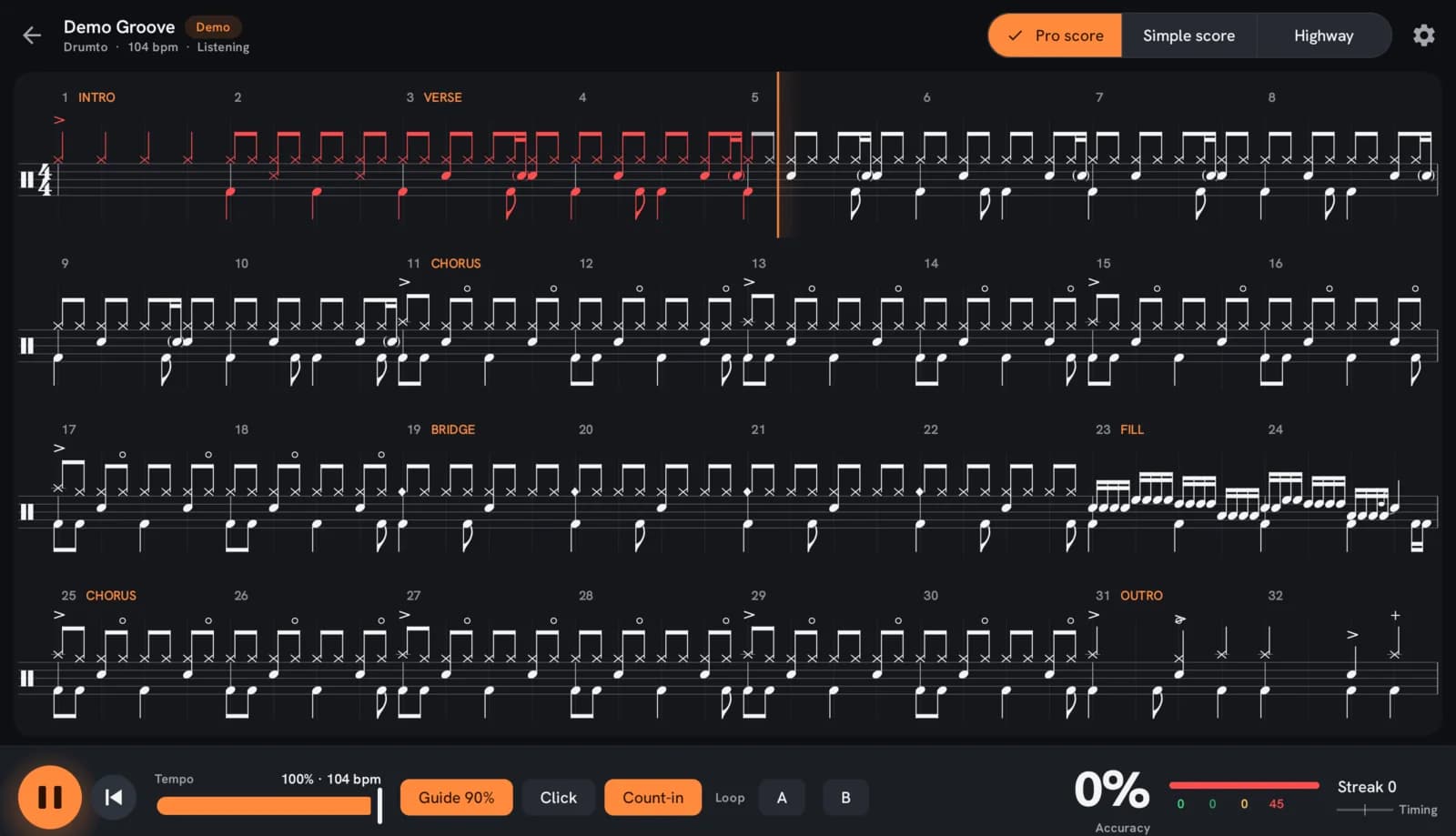
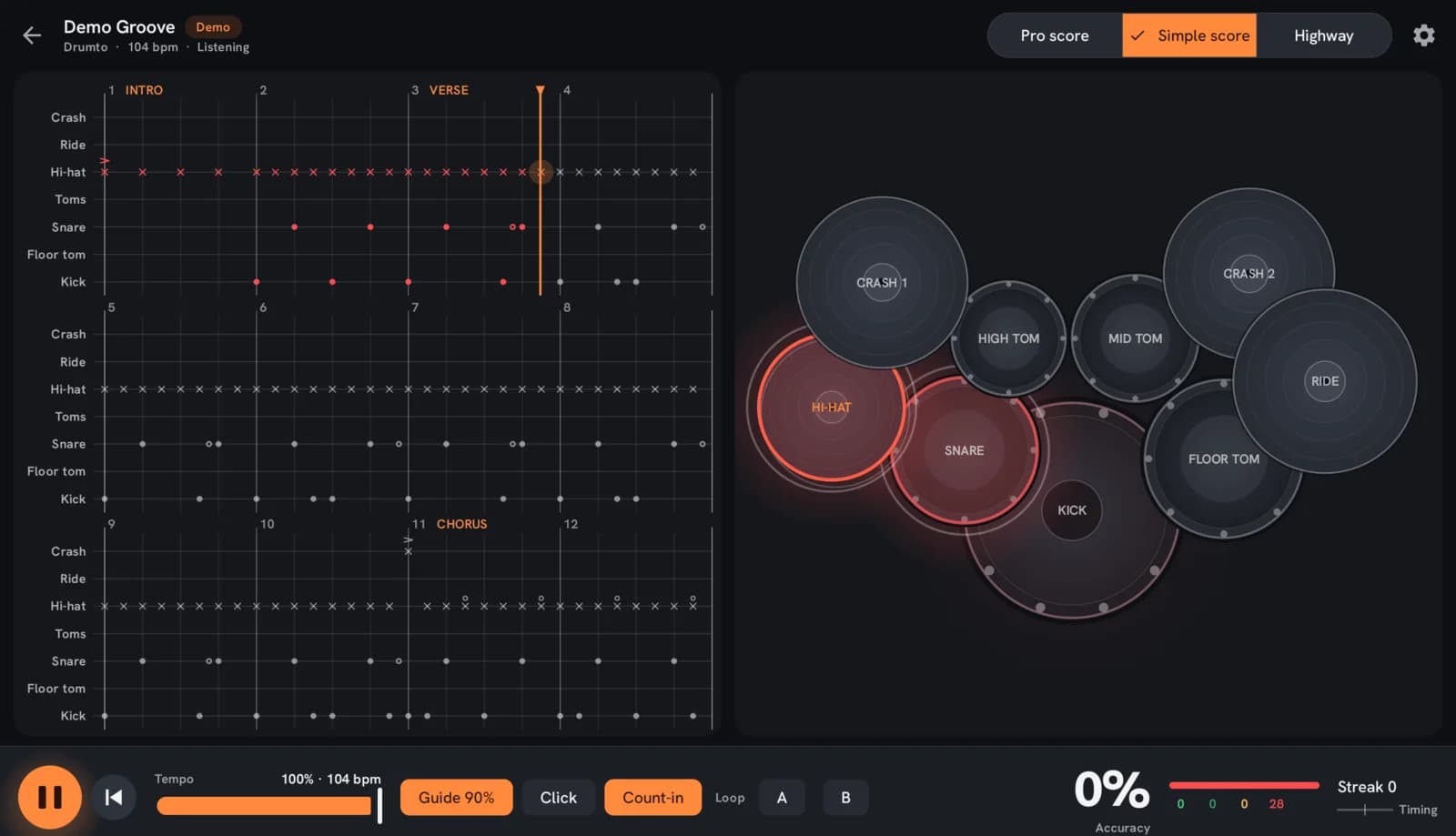
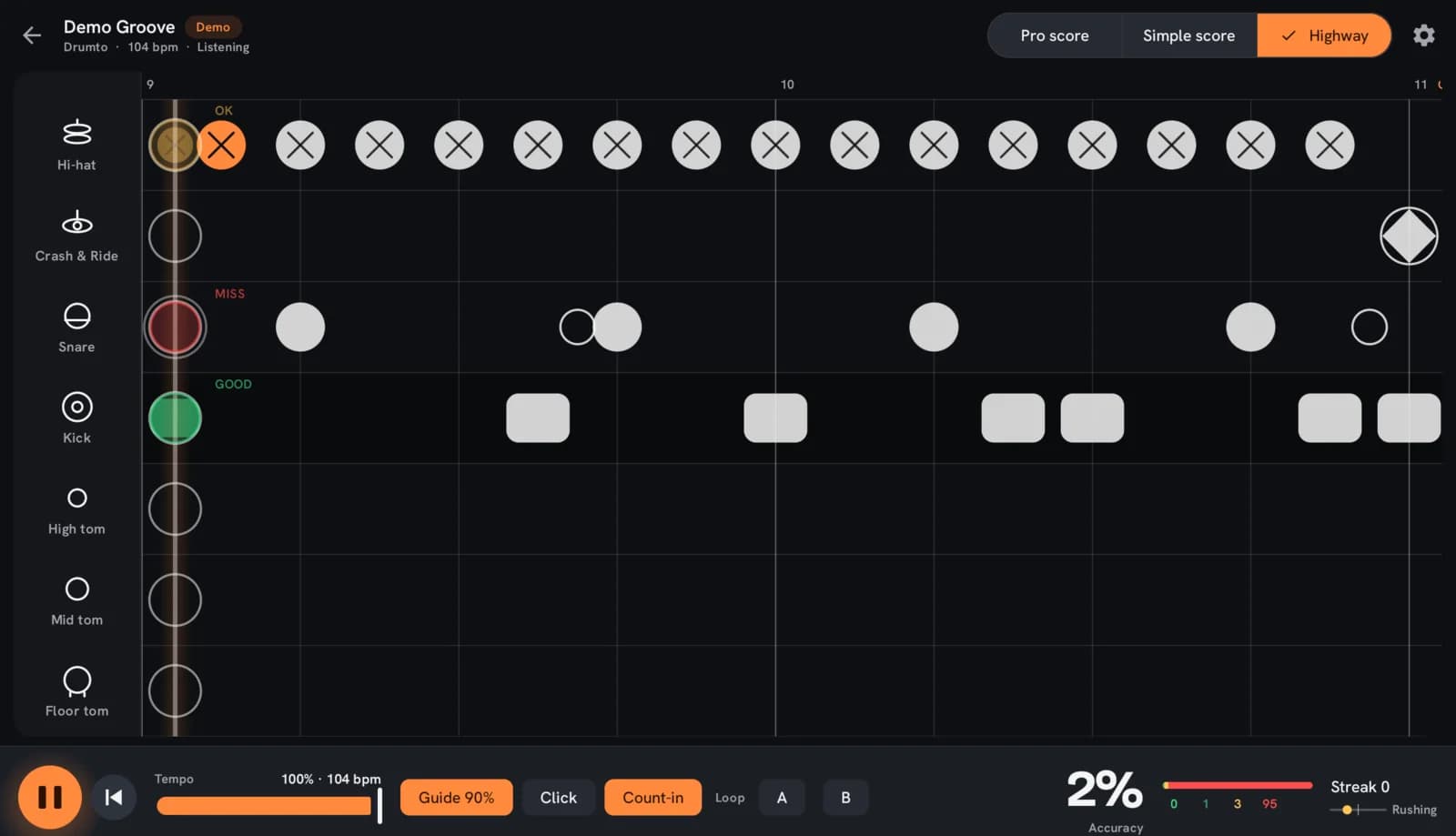
Screenshots of the app on a tablet, playing the built-in demo groove.
Hear the drums leave the room
This is the real recording with its drummer lifted out, and the drummer on their own. Switch between the three and you'll hear what you play along to and what the chart was built from.
Separation uses an open-source model that runs on our own servers. Nothing you upload leaves them.
Every hit graded to the millisecond
The app times each pad hit against the chart and grades it perfect, good, ok or miss. On the score, a note turns green when you hit it and red when you don't. On the kit, the piece lights up when it's due, then flashes the result. At the end you see where you rush, where you drag, and which piece to work on.
- Perfect
- ±40ms
- Good
- ±80ms
- OK
- ±120ms
- Miss
- beyond
Windows widen by a quarter below 70% tempo, so slowing down is never punished.
- Hi-hat96%
- Kick94%
- Snare98%
- Ride100%
- Crash100%
- Tom 1100%
- Tom 2100%
- Floor tom100%
- Crash 2100%
Synthetic take on the built-in demo groove, shown for illustration.
Works with the kit you already have
If your module sends MIDI, Drumto hears it. Plug an Android tablet into the module over USB, or pair a Bluetooth MIDI adapter, and every pad hit arrives with a timestamp.
- USB, with an OTG cable
- Most electronic kits are class-compliant USB MIDI devices. A USB-C OTG cable from the tablet to the module is all it takes.
- Bluetooth MIDI
- Modules with Bluetooth MIDI, or a small BLE MIDI adapter on an older kit, pair straight to the tablet with no cable.
- Map your pads once
- A short setup hits each piece in turn and remembers your kit. Rim shots, open hats and the bell are optional steps.
- Calibrate once per tablet
- Android tablets add their own audio delay. A twenty-second click test measures it so your timing is judged, not your hardware's.
One plan. Pay monthly, or pay less yearly.
Everything included on both. The annual plan is 40% cheaper.
Monthly
Billed monthly. Cancel any time.
Annual
Save 40%£71.93 billed once a year. £47.95 less than monthly.
- Unlimited song uploads
- Drumless backing track and isolated drums for every song
- Exact charts from MIDI or MusicXML, or a transcribed draft
- Three ways to read the part: Pro score, Simple score, Highway
- Live hit grading in every view
- Tempo from 50% with pitch intact, bar looping, count-in
- Practice history: accuracy, early and late, per piece
- Any class-compliant USB or Bluetooth MIDI kit
Two tracks free, no card. Every account can upload two songs and run them through the whole pipeline before paying anything. They stay yours if you never subscribe.
Subscriptions are sold on this website only. The Android app is where you practise, and it never asks you to buy anything. Checkout is handled by Paddle, our merchant of record, and prices include VAT where it applies.
Questions drummers ask
Which electronic drum kits work?
Any kit whose module sends MIDI over USB or Bluetooth LE. That covers the large majority of current kits. You map your pads once in a kit profile and the app uses that mapping for every song. We don't list brands as tested until we have tested them.
Do I need to read drum notation?
No. Every track can be played in three views and you can switch mid-song: Pro score is proper engraved drum notation, Simple score is one row per drum with the part named on the left, and Highway scrolls the notes towards a target line like a rhythm game. All three grade every hit the same way.
Is there an iPhone or iPad app?
No. Drumto is built for Android tablets, which is where the gap is. The website works everywhere for uploading and managing your account.
What can I upload?
Audio as mp3, wav, flac or m4a up to 50 MB, and optionally a drum part as MIDI or MusicXML from your notation software. You must own the recording or hold the rights to use it for personal practice, and you confirm that on every upload.
How long does processing take?
Usually a few minutes. Drum separation is the slow part; on our worker a four-minute song takes about a minute, and the rest of the pipeline seconds. The track page updates itself as each stage finishes.
What if the automatic chart is wrong?
Transcribed charts are marked as drafts, and the tablet shows that badge until the chart is reviewed. Upload a MIDI or MusicXML part and it replaces the draft with an exact chart, or re-run transcription from the track page. The score you see on the tablet and the MIDI it plays against are always the same chart. A chart editor in the web portal is on the way.
Who can hear the songs I upload?
Only you. Audio and charts are stored privately under your account and are never shared between users or used to build a catalogue. Deleting a track deletes its files.
Does the tablet need to be online?
To download a track the first time, and at the end of a run so your results are saved. Stems and charts are stored on the tablet once downloaded, so playing along doesn't need a connection.
How do I cancel?
From your account page, which opens Paddle's customer portal. You keep access until the end of the period you've paid for, and your two free tracks stay available without a subscription.